Pulse DevTools
Pulse DevTools provide a powerful visual inspector to debug your reactive graph. It allows you to see all Sources, Guards, and Computeds, their current values, and how they relate to each other.
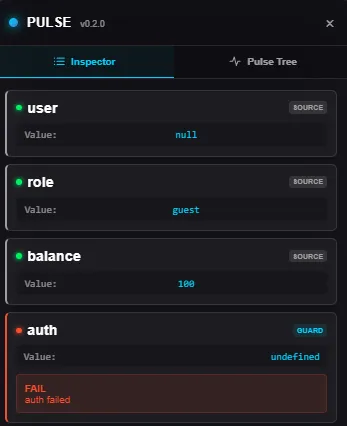
Named Units Only: Only sources and guards with explicit names are visible in DevTools. Unnamed units work perfectly but are not tracked to avoid HMR instability.
Installation
Section titled “Installation”npm install @pulse-js/toolsQuick Start (React)
Section titled “Quick Start (React)”The easiest way to use DevTools in React is via the auto-injector. This will automatically inject the inspector when your app is running in development mode.
import '@pulse-js/react/devtools';Manual Usage (Web Component)
Section titled “Manual Usage (Web Component)”Pulse DevTools are built as a standard Web Component, making them compatible with any framework or Vanilla JS.
<script type="module" src="@pulse-js/tools"></script>
<pulse-inspector shortcut="Ctrl+M"></pulse-inspector>
Attributes
Section titled “Attributes”| Attribute | Description | Default |
|---|---|---|
shortcut | Key combination to toggle visibility (e.g., Ctrl+M, Ctrl+Shift+P, Alt+D). | Ctrl+M |
Framework-Specific Integration
Section titled “Framework-Specific Integration”If you want more control, you can use the PulseDevTools component.
import { PulseDevTools } from '@pulse-js/react/devtools';
function App() { return ( <> <PulseDevTools shortcut="Ctrl+Shift+D" /> <MyAppComponent /> </> );}Import the tool in your main entry point and use the tag in your root component.
<script setup>import '@pulse-js/tools';</script>
<template>  <pulse-inspector />  <router-view /></template>
Vite Configuration: You must tell the Vue compiler that
pulse-inspectoris a custom element to avoid warnings.
export default defineConfig({ plugins: [ vue({ template: { compilerOptions: { isCustomElement: (tag) => tag === 'pulse-inspector' } } }) ]})Svelte
Section titled “Svelte”Import once at the top level.
<script>  import '@pulse-js/tools';</script>
<pulse-inspector /><main>...</main>
Svelte handles custom elements natively. If you encounter issues with Svelte 5 runes mode, ensure you are importing the tools at the very top of your entry file.
Why use DevTools?
Section titled “Why use DevTools?”- Real-time Inspection: See values change as you interact with the app.
- Dependency Tracking: Understand why a guard failed by looking at its dependencies.
- Semantic Errors: View the full
reasonandmetaobjects of failing guards. - SSR Hydration Check: Verify that server-side state was correctly restored on the client.